Flexpay
An add-on to the standard Flexepin redemption flow — for the specific case of a customer who wants to pay with Flexepin but doesn't have a voucher yet.
What is Flexpay?
Flexepin's classic redemption flow always remains in place: a customer who has already purchased a voucher manually enters their 16-digit PIN into the merchant's cashier, and the merchant validates and redeems it directly via the Merchant API. Flexpay does not replace this.
Flexpay is an add-on that covers a different case: a customer who wants to pay with Flexepin but doesn't already have a voucher. Rather than sending them away to go buy one and come back, Flexpay lets them buy and redeem a voucher in one seamless flow, without leaving the merchant's site — helpful in general, and especially useful when another payment method has just failed (e.g. a card decline).
| Classic flow | Flexpay | |
|---|---|---|
| Customer already has a voucher? | Yes | No |
| PIN entry | Customer types it in manually | Not required — delivered automatically via webhook |
| Redemption | Merchant calls Validate / Redeem directly | Merchant receives the PIN via webhook, then calls Redeem |
How Does It Work?
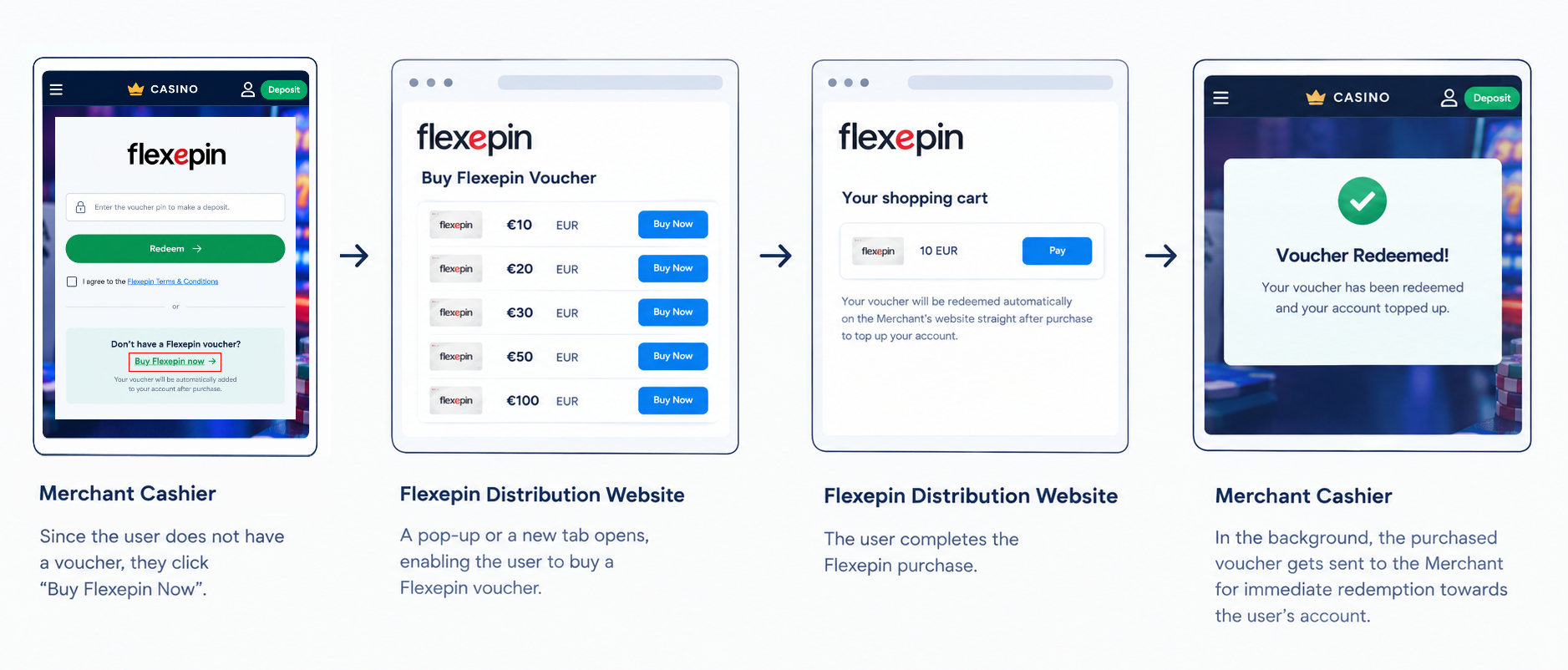
🔍 Click to enlarge — The Flexpay user journey, from the merchant's cashier, to the Distributor's site, and back.
Behind the Scenes
While the diagram above is what the customer sees, here's the technical shape of what's actually happening.
- When the distributor website opens (e.g. in a new tab), the merchant passes various identifying data elements to the Distributor as query parameters.
- The customer purchases their voucher on the Distributor's site. Unlike a classic Flexepin purchase, the voucher PIN is not given to the customer at this point.
- Instead, Flexepin delivers the PIN directly to the merchant, via a webhook — along with the customer data originally passed when the new tab was opened, so the merchant knows exactly which customer to credit.
- The merchant's system must respond to that webhook with a success result (
{"resultCode": 0, ...}), which unlocks the voucher for use. Until this happens, the voucher remains locked and cannot be validated or redeemed. - The merchant then calls the Redeem API — the same one used in the classic flow — to redeem the voucher and credit the customer's account.
- The merchant shows the customer confirmation that their account has been topped up.
Full detail on each of these is covered in the sections that follow.
Technical Flow Diagram

🔍 Click to enlarge
Now that you've seen how it works, here's how to build it in five small steps.
1. UI Changes
A few simple additions are needed on the merchant's payment screen:
- Static text: "Don't have a Flexepin voucher?"
- A hyperlink labeled: "Buy Flexepin Now"
- Supporting text: "Your account will be topped up automatically, straight after purchase!"
See the wireframe below for guidance on how this should look.
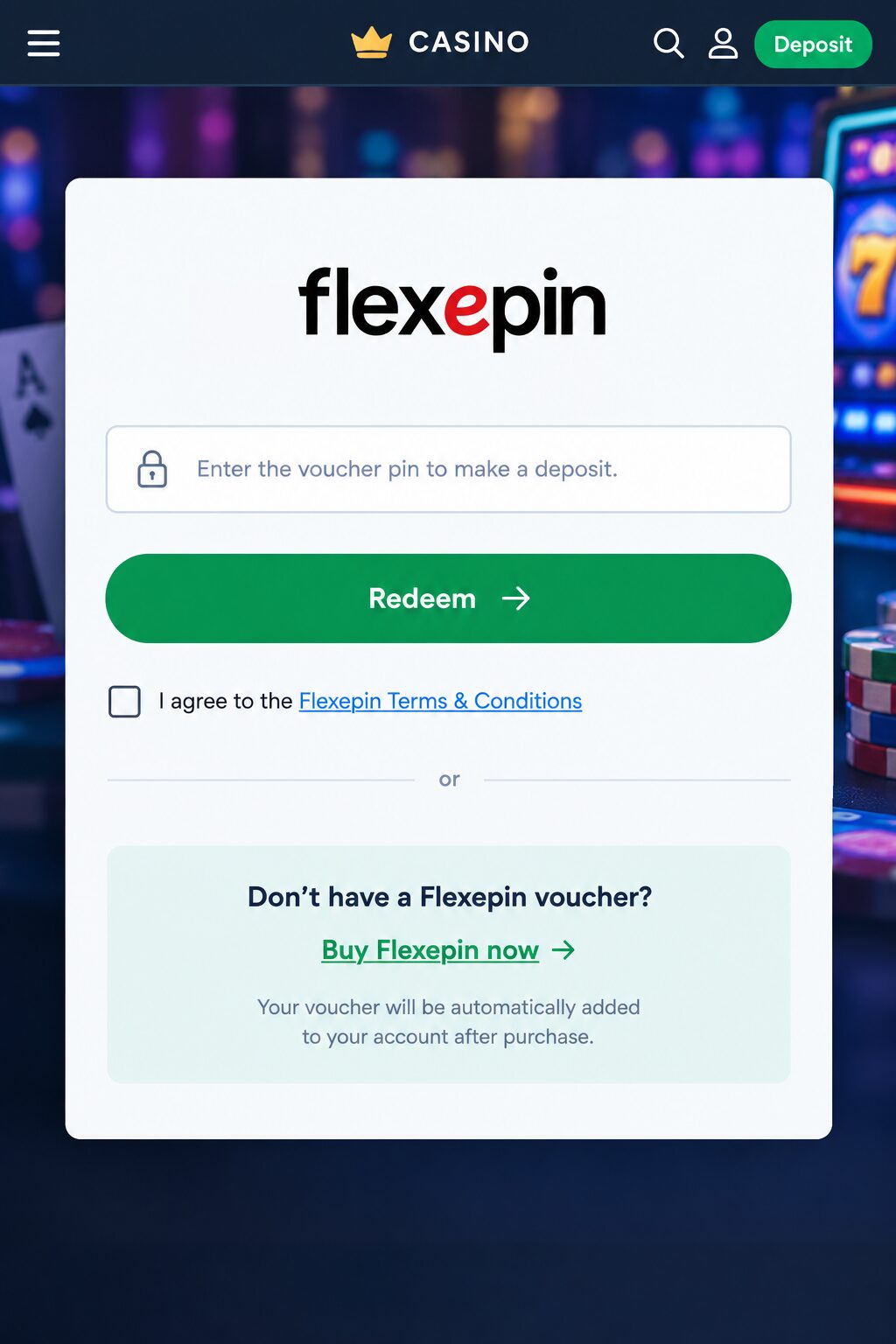
🔍 Click to enlarge
2. Buy Flexepin Now
When the customer clicks Buy Flexepin Now, a new tab opens, taking them to the Distributor's website — this is where they'll purchase their voucher.
Which URL to Use
Open the Voucher Distributor URL for your environment:
| Environment | Voucher Distributor URL |
|---|---|
| Test | https://demo.staging.flexepin.com/flexpay/voucher-purchase |
| Production | https://flexpay-router.flexepin.com/router |
Parameters to Pass
Attach the following parameters to that URL:
| Parameter | Description |
|---|---|
merchant | The merchant's unique Flexpay ID, assigned by Flexepin. Provided by the support team during integration. |
session_id | A unique session ID, expiring in 30 minutes, max 18 characters. |
customer_id | The customer's unique identifier, assigned by you as the merchant. |
name | The customer's name. |
email | The customer's email address. |
Note: additional parameters can be passed to the Distributor as needed.
Since the parameters may include characters that need to be encoded (like the @ in an email address), build the URL using your language's standard encoding function rather than concatenating strings by hand. Example:
<a id="buyFlexepinLink" href="#" target="_blank">Buy Flexepin Now</a>const params = new URLSearchParams({
merchant: 'MMMD',
session_id: '3979573hGHG',
customer_id: '123456789',
name: 'John',
email: 'john@example.com'
});
document.getElementById('buyFlexepinLink').href =
'https://demo.staging.flexepin.com/flexpay/voucher-purchase?' + params.toString();This produces: ...voucher-purchase?merchant=MMMD&session_id=3979573hGHG&customer_id=123456789&name=John&email=john%40example.com — notice the @ becomes %40 automatically.
3. Webhook
Background: normally, when a customer purchases a voucher from a Distributor, the voucher PIN is provided by the Distributor to the customer straight after purchase. With Flexpay, the voucher PIN is instead sent by Flexepin directly to the merchant, via a webhook, for redemption towards the customer's account.
What You Need To Do
- Implement a webhook endpoint so Flexepin can send you the voucher PIN and other relevant data.
- Communicate your webhook URLs — both staging and production — to Flexepin.
Example Webhook Request
Flexepin sends a POST request to your webhook URL:
{
  "initiator": "Distributor",
  "transactionNo": "10299304",
  "externalTransactionNo": "434521",
  "qty": 1,
  "value": 20,
  "customer_id": "05ccc908-ba71-4708-a85c-e96ed57a8943",
  "session_id": "92b0f658-03eb-443a-b367-d5b05e121219",
  "name": "John Doe",
  "email": "john.doe@example.com",
  "voucherPins": [
    {
      "voucherPin": "6157053239145142",
      "voucherSerialNumber": "52060500000694582"
    }
  ]
}| Field | Description |
|---|---|
voucherPins | The voucher PIN(s) to redeem towards the customer. |
transactionNo | Transaction number. |
externalTransactionNo | External transaction number. |
initiator | The Distributor's code. |
customer_id, session_id, name, email | The same values you originally passed to the Distributor when the new tab was opened — use these to credit the correct customer account. |
Mandatory Response
You must respond to every webhook with a result code. The voucher cannot be validated or redeemed until you respond with success (resultCode: 0). Once you do, it becomes usable.
Success:
{
  "resultCode": 0,
  "resultDescription": "Success"
}
Failure:
{
  "resultCode": 999,
  "resultDescription": "Merchant's reason"
}If you do not respond with resultCode: 0 — or don't respond at all — the voucher remains locked and cannot be validated or redeemed via the Validate/Redemption APIs (Step 4, Redemption).
Error Handling
Standard HTTP status codes indicate whether your response was received at all — HTTP 200 means it was. The resultCode / resultDescription fields you return are the application-level result, separate from the HTTP status.
Security
A few options are available for securing your webhook URL:
- API Key — Flexepin can submit a secret, pre-agreed
api_keyso you can verify a request genuinely came from Flexepin (e.g. returned asX-API-KEYin the callback header). By default, the same API key shared with your Merchant credentials can be used. - IP whitelist — Flexepin can share its platform IP address(es) on request, so you can whitelist and block unauthorised senders.
- HTTPS — highly recommended for your webhook endpoint.
Original reference: Webhook-info.pdf.
4. Redemption
As covered in the Webhook section (Step 3), Flexepin delivers the voucher PIN(s) via webhook, along with the customer_id, session_id, name, and email you originally passed to the Distributor when the new tab was opened (Step 2, Buy Flexepin Now) — use these on your own system to identify which customer account to credit.
The voucher cannot be redeemed until you've responded to its webhook with a success result (resultCode: 0) — see Step 3, Webhook.
Once unlocked, redeem the voucher(s) using the Flexepin Merchant API — the same Redeem call used in the classic flow, covering the HMAC signature, request/response shape, and result codes in full. It's good practice to also show a UI notification to the customer once this completes.
5. Payment Cascade
Since the Flexepin voucher purchase decline rate is extremely low, it's important to add it to your payment method acceptance cascade as a fallback to your other payment methods. In other words: if a customer tries to top up by card (or another method) and the transaction fails, they should be referred to Flexepin so they can still top up — Flexpay is what makes this work instantly even if they don't already have a voucher on hand.
Frequently Asked Questions
Where can I find my Flexpay Merchant ID?
This is sent to you by the Operations team at the same time as your Staging/Production environment credentials. Note: the Flexpay Merchant ID is different from the one used for the Merchant Portal.
What do you mean by "customer's ID"?
This is the unique ID assigned by the merchant to the customer who initiates the Flexpay flow to top up their account.
Why is it necessary to pass the customer's name and email to the Distributor?
The Distributor uses this data to auto-populate certain fields on their site, or to automatically register the customer if required — for a smoother user journey.
How do we test with a Distributor?
Use the test Voucher Distributor URL and the code sample in Step 2 (Buy Flexepin Now) — this is a "mock distributor" site available for testing.
Once we transition to production, which voucher Distributor URL should be used?
See the Voucher Distributor URL table in Step 2 (Buy Flexepin Now) — the production URL must always be used along with the mandatory query parameters.
How do you know where to point the webhook?
You must communicate your staging and production webhook URLs to Flexepin directly.
How can I ensure the security of the webhook?
See the Security section under Step 3 (Webhook) — options include an API key, IP whitelisting, and HTTPS.
Why should I put Flexepin in my payment method cascade as a fallback?
Flexepin is a reliable way for a customer to top up their account, since it's common for other methods (e.g. card transactions) to fail. When a different payment method fails, the customer should be presented with Flexepin as a way to still complete their top-up.